
A high-pass filter is one of the easiest tools you can use to make your audio sound clean. It removes low rumble, mud, and noise that you usually don’t want in a mix. Even beginners can use it to make vocals, instruments, and full songs clearer. In this guide, you’ll learn what it is, how it works, and how to use it in mixing and mastering.
Table of Contents
Why and When to Use a High-Pass Filter
High-Pass Filter in the Mixing Stage
High-Pass Filter in the Mastering Stage
Common High-Pass Filter Mistakes
What is a high-pass filter?
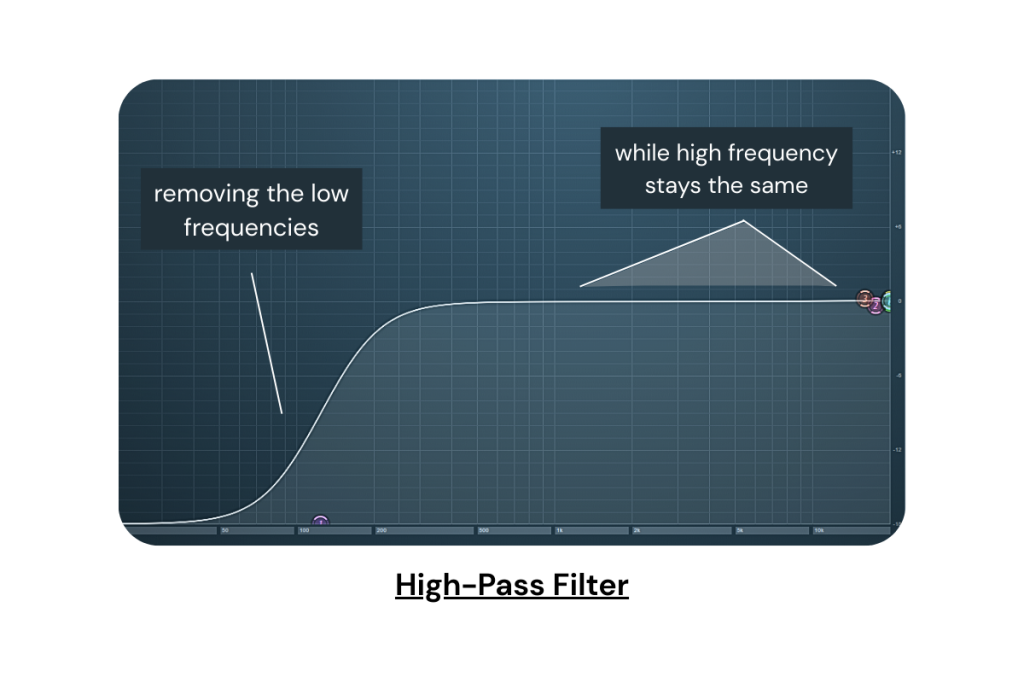
A high-pass filter removes low-frequency sounds and lets high-frequency sounds pass through. It works by using a cutoff point, which is where the filter starts reducing the low end. For example, if the cutoff is set to 100 Hz, any sound below 100 Hz gets lowered, while everything above it stays the same. This helps remove rumble, mic bumps, and unwanted bass that can make audio muddy.
Why and When to Use a High-Pass Filter
A high-pass filter is useful when your audio has low-end noise that does not help the mix. This noise may come from room sounds, handling noise, or background vibrations. Cutting these unnecessary frequencies makes your audio cleaner and easier to control.
Most instruments (except bass instruments) and voices do not need deep bass. Keeping that extra low end can cause frequency masking, where important sounds get covered by unwanted noise.
Read More to know about music frequencies.
Frequency masking is when two sounds share the same frequency range, and one sound covers or hides the other. This makes the mix feel muddy or unclear.
When to Use a High-Pass Filter?
- The track has rumble, hum, or mic handling noise
- The sound does not need deep bass (like vocals, guitars, pianos, pads)
- Your mix feels muddy or unclear
- Multiple tracks are fighting in the low end
- You want more space for the kick and bass
- You hear boominess in room recordings
- You need cleaner audio for mixing or mastering
- You want to remove low-end noise from field or outdoor recordings
Practical Tips for Using a High-Pass Filter in the Mixing Stage
1. Decide who owns the low end
Kick and bass are the main low-end elements. Keep other sounds out of their way.
2. Remove low end from non-bass sounds
Removing low frequencies from vocals, guitars, pianos, pads, and background sounds.
Raise the cutoff slowly until you hear the tone change, then back off a little.
3. Use gentle slopes on important instruments
For lead vocals, main guitars, and pianos, use a gentle slope (6 or 12 dB).
This cleans the low end without making them sound thin.
4. Use steeper filters for noisy tracks
If a recording has heavy rumble or boom, use a steeper slope.
This works well for room mics, noisy recordings, and ambient sounds.
5. Clean your effects
High-pass your reverb and delay sends.
This stops the effects from adding extra mud.
Practical Tips for Using a High-Pass Filter in the Mastering Stage
In mastering, the filter type must be used very carefully.
Start very low, around 20–25 Hz, with a gentle slope (6 or 12 dB).
These deep frequencies are hard to hear but can push the limiter and make the master unstable.
By trimming only the lowest rumble, you clean the mix without touching the power of the kick or bass.
Steep slopes or high cutoff points can change the entire feel of the song, so avoid those.
A gentle, low cutoff removes what the listener will never miss and keeps the music natural.
This approach gives more headroom and a tighter, cleaner master.
Want a clean master fast? Try out Remasterify if you want to make your audio stand out without risking your mix.
Mistakes to Avoid
High-Pass Filters Can Cause Phase Shift
A high-pass filter can slightly change the shape of the sound wave. This is called phase shift. It’s normal, but using strong or steep filters can make the audio feel less natural. Keep slopes gentle to avoid this.
Read More to know about phase cancellation.
Not All Sounds Need a High-Pass Filter
You don’t have to high-pass everything. Sounds like kick, bass guitar, 808s, and low synths need their low end. Cutting them too much will remove the weight and power of the track.
Cutting Too High Without Listening in Context
Many beginners push the cutoff too high. Always listen inside the full mix—not just in solo. What sounds “clean” in solo may sound thin or weak in the full arrangement.
Adding a High-Pass Filter by Habit
Don’t use a high-pass filter just because it’s a common step. Only use it when the track actually has unwanted low end. If the sound is already clean, you may not need a filter at all.
Frequently Asked Questions
What is a high-pass filter in audio?
A high-pass filter removes low frequencies and lets the high frequencies pass through. It helps clean rumble, noise, and unwanted bass.
Should I use a high-pass on vocals?
Yes, most vocals need a high-pass filter to remove low-end noise and make the voice sound clearer. Just don’t cut too high.
What is the purpose of HPF?
The purpose of an HPF is to clean the low end by removing sounds that don’t help the mix, like rumble, mud, or handling noise.
What is the difference between a high-pass and a low-pass filter?
A high-pass filter removes low-frequency sounds while preserving the high frequency, making it useful for clearing rumble and unwanted bass. A low-pass filter does the opposite. It removes high-frequency sounds and keeps the lower ones.