
AI audio mastering has become a practical solution for independent musicians, producers, and creators who want release-ready audio without booking a mastering studio.
Tools like eMastered and Remasterify promise loudness, clarity, and streaming-ready results using artificial intelligence. On the surface, they appear similar. But once you look closely at pricing, workflow design, and real-world use cases, important differences begin to appear.
This article provides a detailed, experience-backed comparison of eMastered vs Remasterify, focusing on what actually matters when choosing an AI mastering tool in 2026.
Table of Contents:
What Do AI Mastering Tools Actually Do?
Pricing: Why It Affects Sound Quality Indirectly
Album Mastering and Reference Consistency
Controls and Decision Complexity
File Formats and Creator Workflows
Real-World Sound Results: What Users Actually Hear
Trust, Transparency, and User Confidence
Which Tool Is Better for Most Creators?
What Do AI Mastering Tools Actually Do?
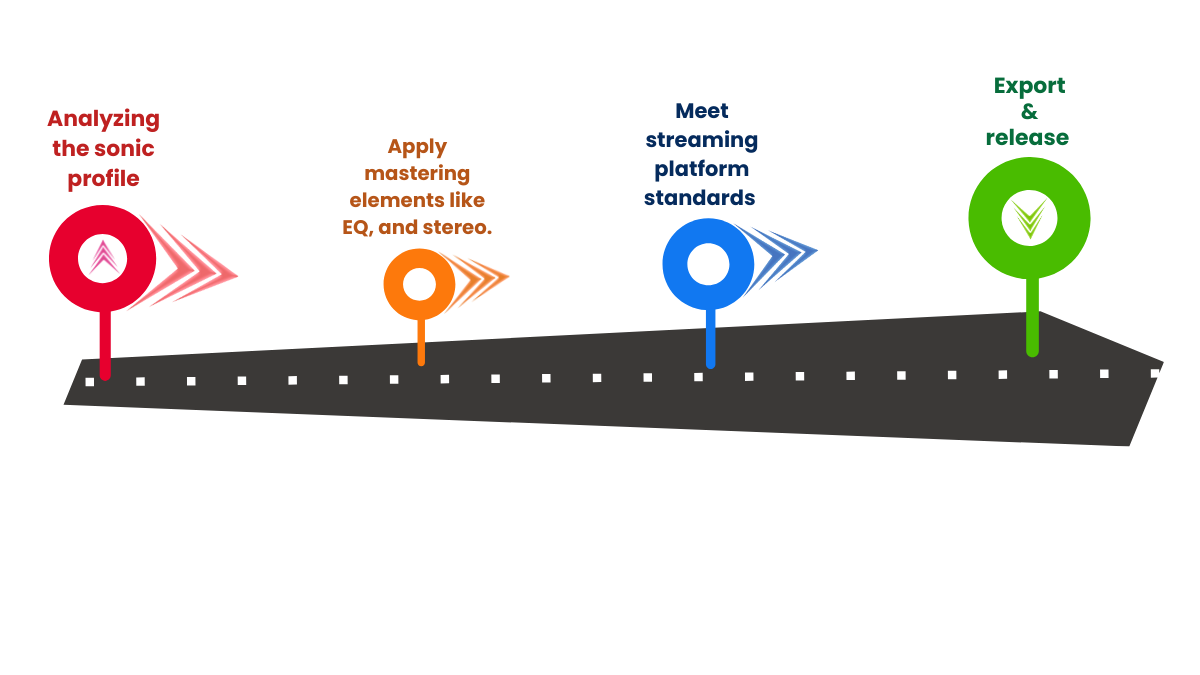
AI mastering tools are designed to apply final processing to a mixed track. They do not replace mixing, and they are not meant to fix major balance issues.
In simple terms, AI mastering tools:
- Analyze loudness, dynamics, and frequency balance
- Apply EQ, compression, limiting, and stereo enhancement
- Prepare files to meet streaming platform standards
- Export masters suitable for release
The effectiveness of an AI mastering tool depends less on marketing claims and more on how well it fits your workflow.
Pricing: Why It Affects Sound Quality Indirectly
Mastering is rarely perfect on the first attempt. Most creators listen, adjust, re-run, and compare versions across devices.
Pricing models either support or discourage this behavior.
Pricing Comparison
| Aspect | eMastered | Remasterify |
| Entry monthly price | $39 (cancel anytime) | Lower monthly cost (region-based) |
| Commitment plans | $19/month (12 months) | No long-term lock required |
| Annual pricing | ~$15/month billed upfront | Unlimited mastering included |
| Export limits | None, but cost-sensitive | No limits |
| Experimentation freedom | Moderate | High |
Why this matters:
When users feel constrained by cost, they experiment less. Less experimentation often leads to worse masters, not better ones.
Unlimited mastering encourages refinement, comparison, and safer results.
Read more: The New Truth in Mastering Prices: Debunking the Quality Myth
Album Mastering and Reference Consistency
For single tracks, almost any AI mastering tool can work. The real test appears when mastering multiple songs.
Consistency across tracks is one of the hardest problems in mastering.
Read more: Album Mastering: How to do it the Right Way and Sound Consistent?
Album Workflow Comparison
| Feature | eMastered | Remasterify |
| Reference track support | Yes | Yes |
| Album-oriented workflow | Manual | Built-in |
| Consistency across songs | User-managed | System-supported |
| Re-running versions | Possible | Encouraged |
| EP/album use case | Secondary | Primary |
Remasterify is designed with album workflows in mind. Running multiple tracks through the same mastering intent is straightforward, which helps maintain tonal and loudness consistency across releases.
Read more: How to Tell If Mastering a Song Went Wrong?
Controls and Decision Complexity
More controls do not automatically mean better results. They mean more decisions.
Control Comparison
| Control Area | eMastered | Remasterify |
| Loudness control | Direct | Indirect (via intensity) |
| Stereo width | Stereo enhancement | Stereo enhancement |
| EQ shaping | Adjustable intensity | Simplified behavior |
| Noise reduction | Limited | Built-in |
| Learning curve | Moderate–High | Low |
Interpretation:
eMastered suits users who enjoy technical adjustment.
Remasterify suits users who want predictable, fast outcomes.
For many independent creators, fewer decisions reduce mistakes and speed up releases.
File Formats and Creator Workflows
Modern creators often work across platforms. Audio is no longer only for music streaming.
Format Support Comparison
| Format / Use Case | eMastered | Remasterify |
| WAV | Yes | Yes |
| MP3 | Yes | Yes |
| MP4 (video audio) | No | Yes |
| HD exports | Yes | Yes |
| Music + content creation | Limited | Strong |
Hence, YouTube creators, podcasters, social media content, and video-based music releases can use Remasterify with their video content.
Read more: Facing Instagram Audio Glitches Regularly? Find the Solution
Real-World Sound Results: What Users Actually Hear
Most creators do not judge masters with spectrum analyzers. They judge them by listening.
Common checks include:
- Headphones
- Phone speakers
- Car audio
- Loud sections for distortion
- Vocal clarity and harshness
Listening Behavior Comparison
| Aspect | eMastered | Remasterify |
| Initial polish | Strong | Controlled |
| Loudness push | Easier | Conservative |
| Harshness management | Manual | Improves via iteration |
| Clipping risk | User-dependent | Reduced over multiple runs |
| Best scenario | One-off mastering | Iterative refinement |
Because Remasterify allows unlimited re-runs, users are more likely to:
- Test different intensities
- Catch clipping issues
- Choose cleaner versions
Iteration often leads to safer true-peak behavior, even without deep technical knowledge.
Trust, Transparency, and User Confidence
Trust is built when tools behave predictably and pricing feels fair.
- eMastered positions itself as a premium mastering solution
- Remasterify positions itself as a practical mastering companion
Unlimited mastering, clear feature inclusion, and export flexibility reduce anxiety around “getting it right the first time.”
This psychological factor matters more than many people realize.
Which Tool Is Better for Most Creators?

Remasterify can do anything that eMastered can do. Moreover, you get more function in Remasterify, even with the less cost for subscription.
Choose Remasterify if you:
- Release music frequently
- Master EPs or albums
- Want unlimited experimentation
- Work with music and creator audio
- Prefer finishing over endless tweaking
Final Verdict
The real difference between eMastered and Remasterify is not sound quality in isolation, it is workflow alignment.
A tool that supports iteration, consistency, and modern content formats is better suited to how independent creators work today. That is where Remasterify stands out.
Mastering should feel like the final step, not a barrier.
For creators who value freedom, consistency, and completion, Remasterify makes more practical sense in 2026.