
Are you facing this?
Your audio sounds great when you play it in your studio. But when you play it outside of your glass-sheltered studio, it sounds worse.
If the sound of your bass and vocals feels dull and distant, you must realize there is a problem with your sound mix. Most probably, you’re mixing sounds that sound muddy.
Mixing engineers who have been in the industry for many years often blame amateurs for not removing muddy sound from good mixes. But this is not true. Muddy sound can be fixed with some technical adjustments. You don’t have to be a pro at it to do so.

How?
Let’s explore this blog. You’ll find here the core reasons why your mixes sound flat and muddy. Also, you’ll get some practical tips to fix your muddy audio clips (you must try them out if you have just started mixing).
Table of Content
- What exactly does muddiness in mixing mean?
- Reasons why your audio mixes sound muddy
- Can a single instrument cause a muddy sound?
- Additional things that develop muddy sound
- How to fix your muddy mix and bring clarity to your audio
- Fixing the trio: EQ, Compression, & Saturation
- From muddy to clear sound, AI remastering can help
What exactly does muddiness in mixing mean?
We’re talking here about muddiness in the audio. So, we need to understand what muddy audio sounds like.
Basically, we can say a sound is muddy when it is usually built up in the low midrange. It can end up masking other important elements of the music and making it hard to hear. You cannot separate the differences between various instruments.
Muddy sound mixes mean unclear sound. It can frustrate your listeners if you do not fix the muddiness.
Generally, a lack of experience in sound mixing can cause muddy audio. However, sometimes it goes out of hand when mixing music, leading to a loss of sound clarity. As a result, a lyrically great song gets diluted and sounds completely flat.
Your audience needs to hear the small taps you made, especially to bring out the emotions of your songs. Whatever you did to your songs must be delivered to your listeners as is, completely intact.
To do this, you need to remove the muddiness of your audio. Before you do the technical part to remove it, understand why your music sounds muddy first.
Reasons why your audio mixes sound muddy
The main culprit behind muddy audio is “build-up”.
When too many frequencies build up, it is 100% certain you are creating a muddy mix.
You can think of it as many similar types of sounds fighting together in the same space. For example, a drum, a bass, and a piano are all playing at the same register. They sound overlapping in the subs, lows, and also in the low midrange.
As we noticed, there are too many sounds at the same frequency. So, it resulted in a “mud” frequency. You can hear anything at 400Hz to feel how mud mixes sounds.
Okay, that happens when more than one instrument gets played in the same space. So, you may ask;
Can a single instrument cause a muddy sound?
The answer is “Yes, of course”. Single instruments can create a muddy sound on their own. When the sound of a single instrument persists for a long time in a sound mix, it can create muddiness. Therefore, mud sound can exist in all spaces, irrespective of all spaces.

Auditory masking creates mud
Before we could understand the main problem of auditory masking, here’s one thing you must do.
Listen to this one song, “Tomorrow Never Knows,” released in 1966 by The Beatles.
In case you have heard the song, you’ll notice that the song has a heavy use of multiple highly compressed tape loops in a continuous pattern. It was done to create a dense sonic texture for the song, but what happens is that these chaotic high- and middle-frequency loops in the songs often mask the subtle elements.
Tunes from acoustic instruments and the Beatles’ vocal additions were masked. It has created muddy or drowned elements for the song. You can hear it out now to check. Listen to the original version.
When two sounds having the same competing energy come together at the same frequency, it becomes hard to hear them separately.
Muddiness is just the failure to filter out excessive low-frequency energy from sources that don’t belong in the mix.
Clean up muddiness in your audio mixes using AI.
Additional things that develop muddy sound
- Too many instruments are stacked in the same range
When guitars, keys, bass, toms, vocals, and pads all live in the low-mid area, your mix starts to lose separation. Each sound may feel fine on its own, but together they blur the clarity of the whole track.
- Poor monitoring environment
A bad room can trick your ears. If your studio has too much bass build-up or uneven reflections, you may under-EQ or over-EQ your track without realizing it. Then, when you play your mix somewhere else, the problems become obvious.
- Overuse of reverb
Reverb adds space and beauty, but too much of it can wash out the entire song. If several instruments have long, overlapping reverbs, especially in the low mids, the result can feel cloudy and distant.
- Weak arrangement decisions
Sometimes the issue is not mixing at all. It is the arrangement. If too many parts are trying to do the same job, the mix will naturally feel crowded. A cleaner arrangement often creates a cleaner mix before any processing begins.
- Excessive compression
Compression can help control dynamics, but too much of it can flatten the life out of a mix. It can also bring up low-level frequency build-up that was less noticeable before, making the track feel thick and boxed in.
How should your audio mixes sound?
Muddy-less, of course.
A well-articulated song must have balanced low-Mids. If we speak this, the 180-350 Hz range should be perfectly managed. The tune should not sound “dull”. Most importantly, all the sounds coming out from different instruments should be distinguishable. Human ears must catch individual sounds.
Can you differentiate between drum sounds that are “tight” and “squashed”?
Well, if yes, you perfectly understand what a good audio mix should sound like.
All your audio mixes should sound clean. Ultimately, you can deliver to your listeners whatever you make. To that end, we have explained the technical adjustments in the next section.
How to fix your muddy mix and bring clarity to your audio
If you’re not a sound engineer, please do not worry. Fixing a muddy mix is not as difficult as it seems. Anyone with some music technical knowledge can do it.
To bring clarity to your audio mixes, here are some tips and tricks you can follow.
Deploy a high-pass filter
The muddy sound occurs when unnecessary frequencies overlap; you need to cut them out. Filtering is the ideal process to do that.
Our human ears can perceive frequencies from 20 Hz. If you want your listeners to detect any tone, you need to create it above this frequency limit. But if you want to improve your listening experience, you must keep the sound frequency below 35 Hz. Anything above will create chaos.
Pro tip: Set a high-pass filter to 24 dB/octave. Do it manually. Listen to the sound with your eyes closed and stop when it becomes thin.
Low-mid resonance
The place where the sound is recorded matters. Some sounds have natural resonance, which requires a controlled space to capture them.
Most of the time, resonance occurs in the low- to mid-range. That’s why you need to control it at this range.
Interestingly, harshness in resonance can appear when the sound is captured using a poor-quality mic. However, you can fix that, too. Suppose you haven’t used a highly expensive mic to capture your music. You can still use AI to improve sound quality and reduce resonance-related harshness.
Fix the quality of your audio within just a few seconds.
Fixing the trio: EQ, Compression, & Saturation
EQ
Amateur audio mixers often go to the other extreme, cutting too much from the low end of every instrument. This can help up to a certain point, but doing it excessively can make the mix too bright.
EQ is often the first place where a thin mix begins. To avoid muddy audio, many beginners start removing too much from the low mids or applying aggressive high-pass filters to almost every track. This may clean up the mix somewhat. But if you keep cutting, important instruments start losing their natural power.
You do not want to remove the strength of sounds like:
- Vocals
- Snare drum
- Rhythm guitars
- Kick drum
These sounds need somebody to feel alive.
For example, snare drums often sound better when their fundamental low-mid area is still present. If that part is cut too much, the snare may sound weak and papery rather than full and punchy.
So, if your mix sounds thin, try reducing some of your subtractive EQ moves. Also, check if your high-pass filters are set too high. Bring them down a little and listen carefully.
The goal is not just to make the mix clean. The goal is to make it sound complete.
Compression
A lack of compression can also make a mix sound thin.
You may ask, how?
When all instruments remain too dynamic, the mix may feel unstable. Some parts jump out, while others disappear. As a result, the song may not feel solid or powerful enough.
Our ears naturally compress loud sounds in real life. That is why compression in music often creates a sense of weight, closeness, and intensity.
This is especially important for:
- Lead vocals
- Drums
- Bass
- Modern pop productions
If these sounds are left too uncontrolled, the mix may feel less energetic than it should.
However, this does not mean you should over-compress everything. The purpose of compression is to control energy, not flatten the life out of the song.
A little controlled compression can help your mix sound stronger, fuller, and more confident.
Saturation
Sometimes EQ and compression are not enough. In that case, saturation can be the right tool to add thickness.
If your mix sounds thin, saturation can help fill it out.
Saturation is a gentle form of distortion. More specifically, it often works like soft clipping. It creates extra harmonics around the sound, giving the ear a sense of greater density and presence.
The best part?
It can make a sound feel fuller without making it obviously distorted.
For vocals, saturation can add density and help the voice feel more present.
For bass and kick drums, it can introduce upper harmonics. This helps those low-end instruments translate better on small speakers while still sounding thicker and more powerful.
So, if your mix lacks body, a small amount of saturation may be exactly what it needs.
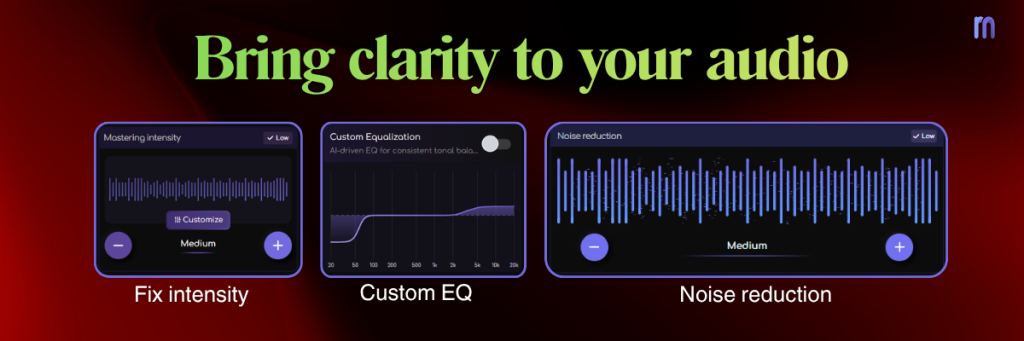
From muddy to clear sound, AI remastering can help
If you struggle to fix muddy mixes manually, AI remastering can be a useful support tool.
Modern AI mastering tools can quickly identify tonal imbalance, excessive low-mid build-up, and lack of clarity. Instead of spending hours making tiny adjustments, you can use AI to get a cleaner starting point or a polished final result.
AI remastering can help by:
- Tightening low-end energy
- Controlling harsh or dull frequencies
- Improving tonal balance
- Enhancing clarity
- Making your mix translate better across listening devices
This does not replace learning the fundamentals of mixing. But it can save time and help you hear your track more clearly, especially if you are still training your ears.
Try Remasterify today, it’s free for 7 days.