
Audio routing decides where your sound goes.
Using audio routing, you can direct audio signals to the places you want them to go.
Suppose you want all your drums to go under one drum bus. Obviously, you must compress or do EQ to bring that in. If you did so, congrats, you just did audio routing.
Let’s get it straight. Here are the reasons why you need to do audio routing.
- You want to organize your mix better and apply effects with more efficiency.
- Probably you have a group of sounds, so you want to combine them.
- It’s your ambition to deliver your listeners a more professional audio experience.
In all cases, audio routing is your solution. Understand how audio routing can improve your signal flow in audio production, shaping your sound more easily and working faster. This guide will reveal everything to you.
Should we begin?
Why Digital Audio Routing Seems Complex
Routing audio signals can confuse you if you’re just starting to create music.
You need to learn audio routing as quickly as possible if you plan to manipulate audio paths in your next creation. It’s also a foundational skill that helps you learn more advanced concepts in audio mixing and mastering.
What is audio routing?
It’s a process in which audio signals from a single source reach multiple destinations, including speakers, headphones, recording devices, or consoles. Audio routing is equally important for fixing audio in both physical and digital worlds.
Routing signal flow in physical devices is comparatively easier than in digital files. In physical devices, you can tune up your input or output devices a bit to pass sound signals. You can even perform manual manipulations to improve the sound. But that is not easy when it comes to audio routing to fix signals in your digital files.
Here’s a complaint from a Spotify user on X about the music streaming platform. Here, he is complaining about audio routing.
Digital audio routing can feel complex because a single sound file can be routed to multiple destinations within a DAW, and you cannot see that path as easily as with physical cables.
It also gets harder because digital production gives you more choices:
- Mono or stereo paths
- Direct output or bus output
- Insert effects or send effects
- Internal plugins or external gear
- Parallel chains, sidechains, and subgroup routing
However, you can fix signal flow in your digital audio files using any powerful software. Nowadays, you have many options, like AI-powered music applications, to make audio routing feel easy.
What is signal flow?
Signal flow is the path your sound takes from start to finish. It can begin with a mic, a guitar, a drum machine, or a synth. Then it moves through your setup until it reaches your speakers or headphones.
A simple path looks like this: sound source → input → processing → output → listener.
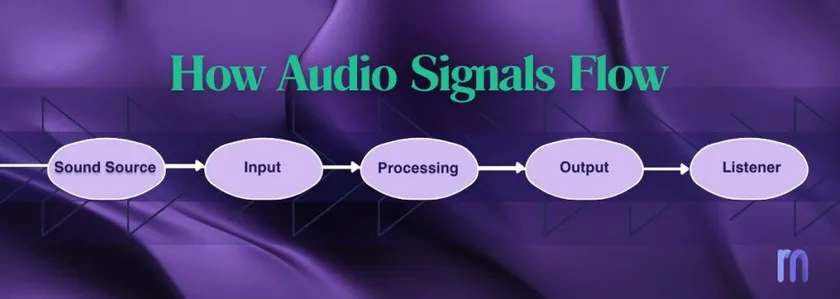
Audio routing is how you choose that path and change it when needed.
Think of it like roads on a map. Your sound needs clear roads. If the road is wrong, the sound may never arrive where you want it to go. That is why signal flow matters so much in music production.
Why audio routing matters
Audio routing matters because it helps you send the right sound to the right place. It also helps keep your audio clean, your workflow fast, and your effects under control.
In a music project, some sounds need to stay dry, some need to reverb, some should go to a drum bus, and some may need special processing without changing the original track. So, smart routing helps you send each sound to the right place, in the right order, for the right reason.
It matters because smart routing helps you:
- Keep your session clean and easy to manage
- Control groups of sounds together
- Use effects in a better way
- Avoid signal flow mistakes
- Save CPU and plugin overload
- Make your final mix sound clearer
For example, instead of adding a separate reverb plugin to every vocal track, smart routing lets you send all those vocals to one reverb aux. That sounds cleaner, uses less power, and gives the mix a more consistent space.

Interestingly, it also helps you fix problems. If a sound is missing, too loud, or going to the wrong bus, routing is often the reason. Good routing makes it easier to find those issues before they ruin your mix.
Basic vocabulary of audio routing
Before you route anything, it helps to know the main parts.
Audio source: This is where the sound begins. It can be a mic, guitar, synth, phone, or audio file.
Input: This is the place where sound enters your system. In a studio, that is often your audio interface or a DAW input.
Output: This is the place where sound leaves your system. It often goes to speakers, headphones, or a file export.
Track: A track carries one sound or one part, like a vocal, snare, or bass line. In many DAWs, tracks go to the master bus by default.
Bus: A bus takes sound from many tracks and bundles them together into one path. This is useful for groups like drums, vocals, or guitars.
Aux channel: An aux channel lets you blend in a processed copy of a sound. This is often used for reverb, delay, and other shared effects.
Send and return: A send takes some of a track’s sound and sends it to an aux. The return brings that processed sound back into the mix.
Master bus: This is the final bus. Almost everything in your project ends up here before it goes out to your speakers or gets bounced to a file.
How routing works in a home studio
Routing starts long before mixing. It begins when you connect your gear. A mic goes into an interface. A guitar may go into a DI box or amp. Then the sound enters your DAW. After that, the master output goes back to your interface and then to your speakers or headphones.
This may sound simple, but it is still routing. You are already telling the sound of where to go. If one cable is wrong, one input is not chosen, or the master output is set badly; your whole session can feel broken. That is why learning to rout early saves so much time.
How routing works inside a DAW
Inside a DAW, routing is more flexible. When you add tracks to a session, they usually go to the master bus right away. From there, the master bus goes to your sound card or audio interface. If you change a track’s destination, you are changing its route inside the software.
You can keep things simple and let every track go straight to the master. Or you can get more control by sending certain tracks to a bus first. You can also send a copy of a track to an aux for reverb, delay, or parallel processing. That is where routing becomes powerful. It lets you shape not just the sound, but the whole workflow of your project.
Buses: how to control many sounds at once
A bus is one place where many tracks meet. If you send all your drums to a drum bus, you can turn them up or down together. You can also add one EQ, one compressor, or one saturator to the whole group instead of loading the same plugin on every single track.
This helps in two big ways.
First, it keeps your project organized.
Second, it makes mixing faster.
Native Instruments gives a great example: if all your drums need to be 2 dB quieter, it is much faster to turn down one drum bus than to turn down every drum track one by one.
A good project often has group buses for drums, bass, synths, guitars, and vocals. That makes it easier to hear the big picture and make changes fast.
Aux channels, sends, and returns: how to share effects
An aux channel is a smart way to share one effect across many tracks.
Instead of putting a new reverb on every vocal and instrument, you can create one reverb aux and send small amounts of each track to it. That saves CPU, keeps the mix cleaner, and helps different sounds feel like they are in the same space.
Here is the key idea: a subgroup takes the main signal and moves it into one group.
An aux is different because it receives a copy of the signal. That copy runs next to the dry sound, not instead of it. This is why aux channels are great for parallel effects.
If you have ever used one delay for many tracks, or one reverb for all your backing vocals, you were already using sends and returns.
If you think if you use pro music mixing tools with their premium subscription to mix great music, think again!
See here Nathaniel has pointed out that pro music tools are not necessarily the easiest tools musicians use. Knowing the basics of music creation plays a vital role in using such pro tools and applications.
Serial routing vs parallel routing
As you have understood, you need to know all the basics of sound signaling. Hence, we must dive deeper for a moment to explore routing further. Audio routing can happen in two ways. These two ideas sound big, but they are easy to understand.
| Serial routing means the sound goes through one thing, then the next, then the next. Guitar pedal chains work like this. In a DAW, inserts on a track also work this way. The order matters. If you put delay before compression, the delayed sound gets compressed. If you swap the order, the result changes. | Parallel routing means the sound splits into more than one path. One path can stay dry. Another path can go to reverb, delay, or compression. Then you blend those paths together at the end. This gives you more control and can make your mix feel richer without losing the original sound. |
Common routing mistakes beginners make
One common mistake is sending tracks to the wrong output. Then the sound does not reach the bus or the master, and you wonder why nothing plays.
Another mistake is forgetting that all tracks already go to the master by default, so you end up routing in circles or doubling things by accident.
Many beginners also put the same reverb on every track instead of using a send. That can make the mix heavy, messy, and hard to control. Using one aux reverb is often cleaner and more efficient.
A third mistake is not checking buses when something goes wrong. Produce Like a Pro notes that if a group like rhythm guitars is not playing back, checking the bus and routing can help you find the issue fast.
How good routing helps your final mix
Good routing does more than organize your session. It helps your mix sound clearer. When your drums are grouped well, your effects are shared in a smart way, and your signal flow is easy to follow, your project feels more focused and less messy. That makes better mixing choices easier.
It also helps at the last stage. A well-routed mix is easier to polish because each part already has a clean job. If you use Remasterify, this matters.
A cleaner mix gives any remastering tool a better starting point. That means your final result is more likely to sound balanced, clear, and ready for release.
Audio routing is just sending sound to the right place. Signal flow is the road that sound travels on. When you understand both, your session gets easier to manage, your effects make more sense, and your mix becomes easier to fix.
Get cleaner mixes with less confusion, try Remasterify AI!