
If you’re creating music, there’s nothing that can devast yourself other than distorted audio clips.
Here’s a few situation you might be facing when you encounter with audio distortion
- Your music sounds broken suddenly after all the hard work you put into it. You have no idea what just happened.
- You’re about to upload your music to any platform or send it for publication. And the track sound does not match your expected outcome.
- Or your track feels unfinished, to be precise, cheap.
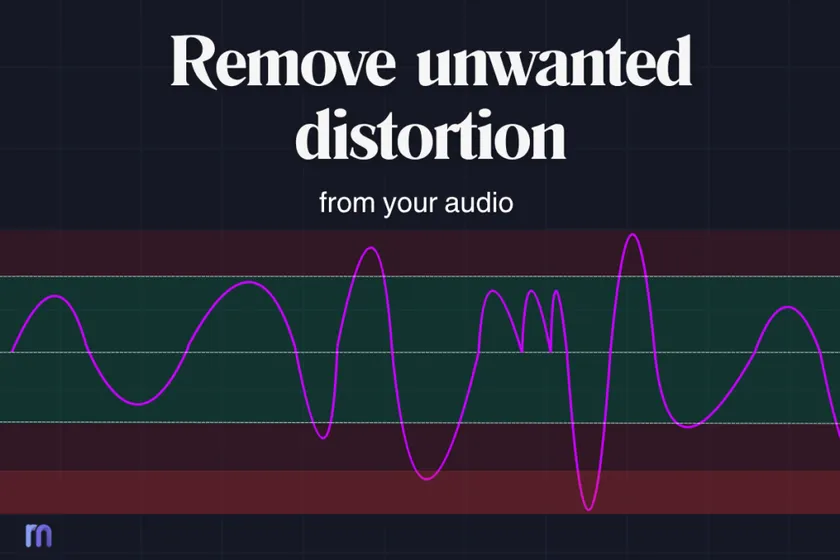
If you’re facing any of the above issues, you need to know there’s a way. AI can help you fix distorted audio within a few seconds. For that, you don’t need to go through any detailed technical flow, at all.
In this blog, we’ll know how to remove distorted audio from your music via the following route;
What Is Audio Distortion?
Audio distortion is any unwanted change to an original sound signal that makes the audio lose its clean, natural shape. It usually happens when the signal is overloaded, clipped, or damaged, causing the sound to become harsh, fuzzy, crackly, or unclear.
What Causes Unwanted Audio Distortion?
The most common reasons your audio starts sounding harsh, fuzzy, or broken are;
Unwanted audio distortion usually happens when the signal is pushed beyond what your system, plugin, or playback chain can handle cleanly. Once that happens, the waveform loses its natural shape, and the sound starts feeling rough instead of clear.
In simple terms, distortion is often a sign that something in your recording, mix, or master is overloaded. The problem can show up at any stage, from input gain to final export.
1. Clipping from levels that are too high
This is the most common cause of distortion. When the signal goes past the safe limit, the waveform gets clipped, and the audio starts sounding harsh or crackly.
This often happens when:
- Recording gain is too high
- The master is pushed too hard
- Limiter settings are too aggressive
2. Bad gain staging
Distortion can also build up when levels are too hot at different points in the chain. Even if the final output looks fine, the signal may already be damaged earlier.
This usually happens in the preamp, plugin chain, buses, or master channel. That is why distortion is not always just a final volume issue.
3. Over-compression or over-limiting
Compression and limiting help control peaks, but too much of either can make the audio sound crushed, sharp, and unpleasant. This often happens when trying to make a track too loud.
4. Harsh frequency buildup
Sometimes the mix is overloaded in certain frequency ranges, especially the upper mids or highs. That can make the track feel brittle, fizzy, or distorted even without obvious clipping.
5. Recording problems at the source
A hot microphone input, bad cable, overloaded preamp, or poor recording setup can distort the sound before mixing even starts. This kind of distortion is usually harder to fix later.
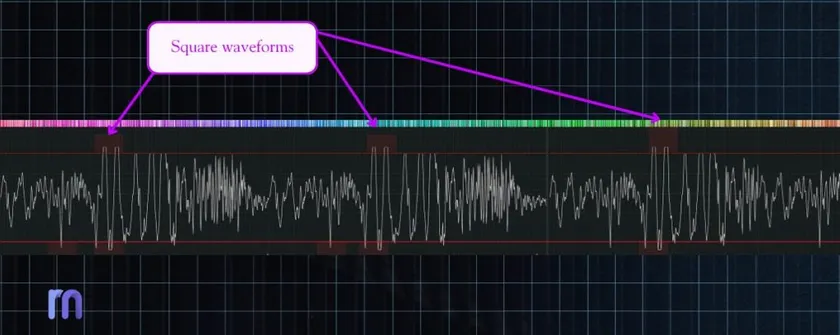
Square waveforms
When a signal is pushed too hard, the waveform starts losing its natural shape and becomes more squared off. This usually happens because extra harmonics are added, especially during clipping or overdriving. As those harmonics build up, the sound becomes rougher, harsher, and more aggressive.
How to Tell If the Distortion Is Intentional or Unwanted
Intentional distortion usually feels controlled. It may add warmth, grit, punch, or edge to a vocal, guitar, bass, or synth without making the whole track feel broken.
Unwanted distortion feels different. It often sounds harsh, fizzy, crackly, or strained in a way that distracts the music. Instead of adding energy, it makes the track feel messy, cheap, or tiring to hear. You may notice it most on vocals, loud peaks, drums, or the master output.
A good test is to listen across headphones, speakers, and low volume playback. If distortion still feels musical and consistent, it may be intentional. If it sounds worse on certain sections or devices, it is likely a problem. In short, intentional distortion supports the sound. Unwanted distortion gets in the way.
Can Distorted Audio Really Be Fixed?
Yes, distorted audio can often be improved, but not always restored perfectly.
If the signal has been heavily clipped or damaged, some of the original waveform information may already be lost. That means the goal is usually to reduce the distortion and make the track sound cleaner, rather than expect a perfect undo.This is where AI audio mastering can help in a practical way.
AI mastering analyzes a track for loudness, dynamic issues, frequency imbalances, stereo width, and noise reduction, then applies adjustments to improve clarity and control. In simple terms, that means it can help tame harsh peaks, smooth uneven dynamics, clean up tonal problems, and reduce the damaged feel of a distorted track.

Listeners fatigue
Unclear sounds can create clutter especially when two or more frequencies club together. The human brain cannot alter the relationship between loud and soft sounds if sounds get distorted. Eventually, it can cause listener fatigue after some point in time.
How to Remove Unwanted Audio Distortion
Removing distortion starts with identifying where it is coming from. If the issue began during recording, the fix will be different from distortion caused by over-compression, clipping, or aggressive mastering. The cleaner your diagnosis, the better your repair result.
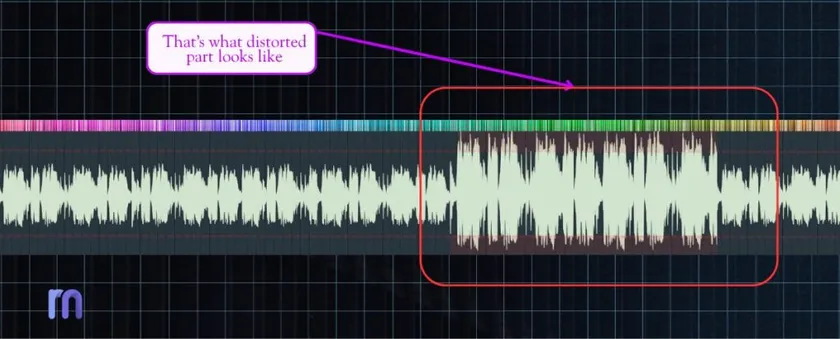
Listen closely to the damaged section in solo. Check whether the distortion shows up only on vocals, drums, loud peaks, or the full mix. If it appears only when the track gets louder, there is a strong chance the signal is clipping or being pushed too hard somewhere in the chain.
Follow these steps:
- Lower the gain first: Reduce the input or output level before doing anything else. This helps stop the distortion from getting worse.
- Isolate the damaged part: Find whether the issue is in one section, one stem, or the entire track.
- Use cleanup tools carefully: Declipping, EQ, and dynamic control can help reduce harshness and smooth the sound.
- Rebalance the mix: Sometimes distortion comes from elements fighting for space, not just from volume.
The goal is not always to make the track perfect. It is to make it cleaner, smoother, and more listenable without damaging the rest of the sound.
Tools and Methods That Can Help Fix Distortion
There is no single fix for every type of distortion. Some tracks need level correction, while others need tonal cleanup, peak control, or more advanced repair. The right tool depends on how the distortion was created.
Common methods that help:
- Gain reduction: Lowering the signal level is often the first step when clipping or overload is involved.
- Declipping tools: These help rebuild damaged peaks and reduce the harsh edge caused by clipped waveforms.
- EQ cleanup: If the distortion feels fizzy or sharp, careful EQ can reduce the most painful frequency buildup.
- Compression: Gentle compression can control unstable peaks and smooth out uneven dynamics.
- Limiting: A transparent limiter can catch problem peaks before they distort again.
- AI audio mastering: This can help improve balance, control loudness, smooth harsh peaks, and reduce the damaged feel of a track without making the process too technical.
Keep this in mind:
Some tools repair distortion directly. Others reduce the conditions that make distortion more obvious. In many cases, the best result comes from combining cleanup, level control, and smarter mastering decisions.
Turn distorted audio into a cleaner, more release-ready sound fast.
Why Distortion Happens During Mastering
Distortion during mastering often happens when creators chase too much loudness too fast. A limiter may be driven too hard, compression may flatten the mix, or certain frequencies may hit the master bus too aggressively. When that happens, the track can start sounding harsh, strained, or broken.
This is especially common when the mix already has unresolved issues. If the low end is messy or the vocals are too sharp, mastering pressure makes those flaws more obvious. That is why distortion in mastering is often a mix problem and a loudness problem at the same time.
How to Prevent Audio Distortion in Future Sessions
A cleaner workflow prevents bigger problems later
The best way to fix distortion is to stop it before it starts. Keep healthy recording levels, leave enough headroom, and avoid pushing plugins harder than necessary. Good gain staging makes a huge difference from the start.
Simple habits that help:
- Do not record too hot
- Check cables and input levels
- Leave space on the master bus
- Use compression and limiting with care
- Test exports before publishing
A clean signal chain always gives you more room to work later.
Manual Audio Repair vs AI Audio Mastering
| Manual Audio Repair | AI Audio Mastering |
| Manual audio repair gives you full control, but it also takes more time, skill, and patience. You need to find the source of the distortion, adjust gain, clean harsh frequencies, control peaks, and test the result across different playback systems. That can work well, but it often becomes slow and frustrating. | AI audio mastering offers a faster path for creators who want cleaner results without going deep into repair workflows. Instead of manually tweaking every setting, AI can analyze the track and improve loudness balance, dynamics, tonal issues, and harsh peaks in a more streamlined way. |
| Manual repair gives more control Manual workflows need technical knowledge | AI mastering saves more time AI tools reduce guesswork |
Remove harsh, broken sound and make your track clean again.
Why Creators Use AI to Clean Up Distorted Audio
It solves the problem with less guesswork
Most creators do not want to spend hours figuring out whether distortion came from clipping, harsh EQ, bad gain staging, or an overworked limiter. They just want the track to stop sounding broken. That is one reason AI audio mastering feels so practical. It gives them a faster way to improve the sound without forcing them through a highly technical repair process.
Why it feels easier
- It saves time. You do not have to test endless plugin settings manually.
- It reduces technical overwhelms. The system analyzes loudness, dynamics, and balance for you.
- It improves the full track, not just one spot. That matters when distortion is tied to overall harshness or unstable mastering.
AI mastering can analyze a song for loudness, frequency balance, stereo width, dynamic issues, and noise reduction, then apply changes that improve the track’s clarity and control.
That does not mean it can magically recover from every broken waveform. But it can make many distorted tracks sound smoother, cleaner, and more release-ready. For creators on a deadline, or creators who simply want a faster path to a usable result, that is often the biggest reason to choose AI.
Taking examples from BBC broadcasts
BBC prioritizes clean audio with zero tolerance to audio distortion. For that, it laid out a detailed technical specification as a standard part of their audio delivery system. This includes;
Integrated loudness must adhere to –23 LUFS (Loudness Unites relative to Full Scale)
Maximum true peak levels must not exceed –1 dBTP
Professional audio delivery is not just a creative preference but a technical need. It helps the BBC avoid sound distortion issues.
Source: BBC technical Specifications
Mistakes to Avoid When Fixing Distorted Audio
A lot of distortion gets worse because creators rush into fixing it without checking the real cause first. If you start adding plugins before lowering levels or checking the source, you may only mask the issue instead of solving it.
Avoid these common mistakes
- Turning the track up again too early. More gain can make clipped or harsh audio even worse.
- It’s over-compressing to hide the problem. This often removes punch and adds more harshness.
- Pushing the limiter harder. A limiter cannot rescue a damaged signal.
- Ignoring frequency buildup. Sometimes distortion is really harsh tonal balance.
- Expecting a perfect restoration. Severe damage may improve but not fully disappear.
The smartest approach is to fix the cause first, then use repair or AI mastering tools to improve what is left. That gives you a better chance of ending up with audio that sounds clean, controlled, and worth releasing.
Clean up unwanted audio distortion in under 30 seconds with AI.
Some Audio Distortion FAQ
1. Can distorted audio really be fixed?
Yes, in many cases distorted audio can be improved, especially when the problem is mild to moderate. If the waveform is heavily damaged, full restoration may not always be possible, but tools like Remasterify can still help make the track sound cleaner, smoother, and more balanced.
2. What usually causes unwanted audio distortion?
Unwanted distortion usually comes from clipping, bad gain staging, harsh frequency buildup, or pushing compression and limiting too hard. If you are not sure where the issue starts, Remasterify can help by improving loudness control and overall balance across the track.
3. Is clipping the same as audio distortion?
Not exactly. Clipping is one of the most common causes of distortion, but distortion can also come from overloaded plugins, harsh frequencies, or recording issues. That is why a broader cleanup process, including AI mastering with Remasterify, can be useful.
4. Can AI audio mastering help reduce distortion?
Yes, AI audio mastering can help reduce the harshness and instability that often make distortion stand out. By improving dynamics, tonal balance, and peak control, Remasterify can help a distorted track sound more polished and release ready.
5. Should I fix distorted audio manually or use AI mastering?
That depends on how much time, skill, and control you want. Manual repair works well for very specific problems, while Remasterify gives creators a faster way to clean up the overall sound without going through a long technical workflow.