
Apple Music has streamed lossless audio for free to every subscriber since June 2021.
Read that again.
Without a premium. Not an add-on. Not even a hidden tier. Every Apple Music listener (100 million) has been hearing every track they play at full CD quality. Or higher for over four years now. Spotify HiFi finished rolling out in 2025. Amazon Music HD covers tens of millions of subscribers. Tidal HiFi Plus continues to grow.
None of this is coming. It’s here.
And if you’re mastering your music the same way you did in 2019, you can imagine this;
A significant portion of your listeners are streaming your songs in a bad state. They’re hearing a version of your song that you never designed.
Table of contents
- Why the Old Approach Stopped Working
- What-Changes-at-the-Mastering-Stage
- FLAC Delivery Specs You Actually Need
- The Apple Digital Masters Program
- What Format You Should Actually Master In
- Common Lossless Mastering Mistakes
- What Your Mastering Tool Actually Delivers
- Where That Leaves You
Why the Old Approach Stopped Working
For nearly two decades, mastering had one simple rule:
- i. If it was louder, it stood out.
The loudness war rewarded masters that pushed every last decibel. Louder records felt more powerful on the radio, in the car, and in a playlist. So engineers kept squeezing more level out of them.
The result was predictable: denser mixes, heavier limiting, and less dynamic range.
Then streaming changed the game.
Loudness normalization removed much of the advantage of mastering louder. A heavily compressed master can simply be turned down during playback. While a more dynamic master can retain more of its natural movement.
But here’s the interesting part:
- ii. The incentive disappeared before the habit did.
A generation of producers and engineers learned to master aggressively. Because, for years, that was the competitive move. Even after normalization changed the rules, the old instinct remained.
Now lossless playback makes that distinction harder to ignore.
When you fall into situations with less codec processing between master and listener. Remember, some decisions that were easy to overlook become easier to hear.
What Changes at the Mastering Stage
Three areas deserve particular attention.
1. Limiting becomes harder to hide
Heavy limiting doesn’t automatically sound bad. But push it too far once. And you can introduce flattened transients, distortion, pumping, and a congested top end.
Lossy encoding can alter those artifacts along the way. Lossless playback is more of what you actually put into the master. It reaches the listener unchanged.
That means an aggressively limited master can reveal its compromises more clearly.
2. True-peak management matters more
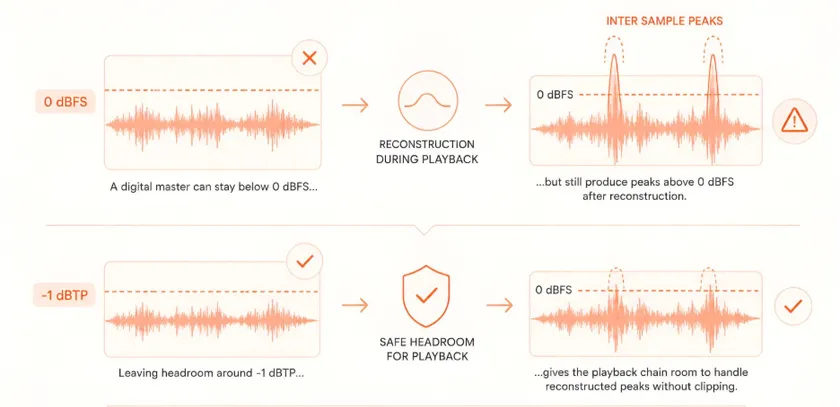
A digital master can stay below 0 dBFS. And it can still produce peaks above 0 dBFS after reconstruction during playback.
Those are inter sample peaks.
That’s why leaving some true-peak headroom is good mastering practice. It’s especially important for streaming delivery. A ceiling around -1 dBTP gives the playback chain more room to handle reconstructed peaks. Also, it does so without unnecessary clipping.
The goal isn’t to make every master quieter.
It’s to make sure the level you’re chasing doesn’t create problems downstream.
3. High-frequency detail becomes more apparent
Lossy codecs remove information according to their encoding model and bitrate. Lossless formats don’t discard that audio information.
That can make subtle high-frequency elements feel more exposed. That includes cymbal texture, vocal air, reverberation tails, room detail, and upper-frequency content.
A mix that felt perfectly balanced after lossy encoding can feel different. But only when heard losslessly.
And that leads to the bigger mastering lesson:
🙅♂️ Don’t master for the codec. Master for the music.
🙆♂️ Use the codec as a delivery format—not as a reason to compromise the master.
👌 The loudness war taught engineers to chase what survived playback.
✨ Lossless playback makes it more important to ask what actually went into the master.
FLAC Delivery Specs You Actually Need
Streaming platforms have converged on a handful of specs. Here’s what each one accepts, and where the differences matter.
| Platform | Format | Bit Depth | Sample Rate |
| Apple Music Lossless | ALAC | 16-bit or 24-bit | 44.1 kHz – 192 kHz |
| Apple Music Hi-Res Lossless | ALAC | 24-bit | 96 kHz – 192 kHz |
| Tidal HiFi | FLAC | 16-bit | 44.1 kHz |
| Tidal HiFi Plus | FLAC | Up to 24-bit | Up to 192 kHz |
| Amazon Music HD | FLAC | 16-bit | 44.1 kHz |
| Amazon Music Ultra HD | FLAC | Up to 24-bit | Up to 192 kHz |
| Spotify HiFi | FLAC | 16-bit | 44.1 kHz |
Two things stand out.
👁️ i. FLAC is the universal delivery format for lossless.
Only Apple uses ALAC, and even Apple accepts FLAC through most distributors. Deliver in FLAC, and you’re covered everywhere.
👁️ ii. Higher sample rates buy you almost nothing for streaming.
24-bit at 44.1 or 48 kHz is the sweet spot. Higher rates increase file size and processing load without producing an audible improvement most listeners will ever hear.
The practical answer: master in 24-bit WAV, deliver to your distributor in WAV or FLAC, let them handle platform-specific conversion.
For the broader format decision on when to use MP3, WAV, or FLAC in different situations, our file format guide covers that separately.
The Apple Digital Masters Program
Apple runs a certification program called Apple Digital Masters. It gives approved releases the badge next to the song title, priority placement in Apple’s search and playlist algorithms, and better positioning in audiophile-focused playlists.
The requirements are specific:
- 24-bit source files at native sample rate
- True peak ceiling at -1 dBTP or lower
- Delivery through an Apple-approved distributor
- Following Apple’s technical guidelines for the program
For releases where Apple Music is a significant portion of your audience, the badge earns its weight. For everyday singles and EPs where your listeners are spread across platforms, meeting the general lossless delivery specs is enough.
Don’t chase the badge on every release. Chase it on flagship work.
What Format You Should Actually Master In
The workflow that holds up across every lossless platform:
👉 Master in 24-bit WAV at 44.1 or 48 kHz. This is your working format. Higher sample rates offer diminishing returns and larger files.
👉 Deliver to your distributor in 24-bit WAV or FLAC. Both are lossless. FLAC is smaller. Either works.
👉 Let your distributor handle the format conversion. Modern distributors accept 24-bit WAV and convert to ALAC for Apple, FLAC for everyone else. You don’t need to prepare separate files.
👉 Never upsample. If your session is 24-bit / 44.1 kHz, keep it there. Upsampling to 96 kHz for “Hi-Res delivery” adds no information. It just makes a bigger file with a marketing badge attached.
Our guide on how to master your track in 5 steps covers the broader workflow this fits into.
Common Lossless Mastering Mistakes
Three real mistakes worth naming.
i. Mastering aggressively and expecting codec smoothing to save you.
Lossless removes the safety net. If your master sounds harsh in a lossless preview, it sounds harsh on Apple Music Lossless. There’s no codec forgiveness anymore.
ii. Delivering at 16-bit when your session was 24-bit.
Bouncing at 16-bit and marking the file “lossless” wastes the tier’s advantage. If you’re delivering to lossless-capable platforms, deliver at 24-bit.
iii. Assuming lossless requires a different mastering philosophy.
It doesn’t. Same LUFS targets. Same true peak ceiling. Same dynamic range principles. What changes is how carefully you apply them.
The pattern in all three: producers try to solve for lossless with a workflow change when the fix is a discipline change.
What Your Mastering Tool Actually Delivers
Modern AI mastering platforms output lossless files by default. Upload a WAV mix, get back a WAV or FLAC master.
Two things to verify:
- Your tool outputs at 24-bit if your session was 24-bit
- The output format is genuinely lossless (WAV or FLAC), not a “high-quality MP3”
The rest is on you. Deliver to your distributor as WAV or FLAC. Let the distributor handle platform-specific conversion.
Where That Leaves You
Lossless streaming isn’t premium anymore. It’s the default for a growing share of listeners.
The mastering workflow that survives this shift isn’t complicated. Master with restraint. Preserve dynamics. Keep true peaks at -1 dBTP or lower. Deliver in 24-bit FLAC or WAV. Trust your distributor to handle the rest.
The producers who adapt sound better on Apple Music Lossless. And they sound just as good on standard Spotify. The producers who don’t adapt sound worse in one place and no better in the other.
The choice isn’t between lossy-optimized mastering and lossless-optimized mastering. It’s between mastering habits built for a codec that no longer protects them and mastering habits built for what your listeners actually hear.
Want to master your music in HD WAV format?
Remasterify delivers HD WAV masters ready for lossless streaming through any distributor. Upload your mix, hear it mastered in minutes, and download a file that holds up wherever it plays.