
You bounce your finished mix, upload it to your distributor, and hit publish. Two days later, you get an email. Your track was rejected.
The reason: wrong file format.
It happens to independent producers constantly. Streaming platforms have specific format requirements, and the wrong choice at export can cost you a release date, a distribution fee, or the quality of your final track.
This post is the honest decision guide to audio file formats. Which one to use at every stage of your workflow, from recording to streaming delivery, with a clear answer at each step.
The Three Formats That Actually Matter
There are dozens of audio file formats out there. For an independent producer in 2026, three of them do the vast majority of the work.
- 📀 WAV is uncompressed audio. Every sample is stored in full, at whatever sample rate and bit depth you recorded at. WAV files are large but preserve every detail of the original recording. This is the standard for professional recording, mixing, and mastering.
- 📀 MP3 is lossy compressed audio. The format was developed in the 1990s to make music files small enough to share over dial-up internet. It works by permanently discarding audio data your ears are less likely to notice. Once a file is converted to MP3, that data is gone.
- 📀 FLAC is lossless compressed audio. It reduces file size by up to 60 percent compared to WAV while preserving every bit of the original recording. It is essentially a compressed WAV that unpacks to the exact same audio.
AAC, AIFF, ALAC, and Ogg Vorbis exist and matter in specific contexts. We’ll cover them briefly later. But MP3, WAV, and FLAC cover 99 percent of the decisions a producer actually makes.
Lossy vs Lossless: The Only Difference That Matters
Every format decision comes back to one distinction. Whether the file is lossy or lossless.
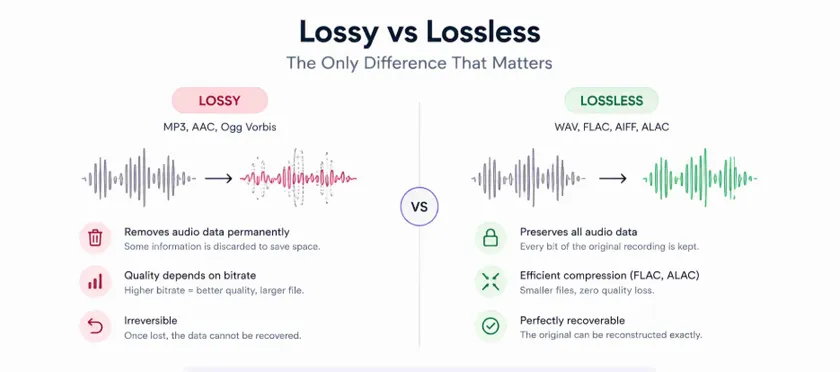
→ Lossy formats (MP3, AAC, Ogg Vorbis) permanently discard audio data during encoding. The algorithm analyzes what parts of the audio the human ear is less likely to notice and removes them to save space. The trade is space for quality, and the quality loss is irreversible. Once you convert a WAV to MP3, you cannot get the original back by converting the MP3 to WAV. The lost data is gone. Lossy encoding quality is controlled by bitrate. A 128 kbps MP3 sounds noticeably worse than a 320 kbps MP3. Higher bitrate means more of the original data survives, at the cost of larger files.
→ Lossless formats (WAV, FLAC, AIFF, ALAC) preserve every bit of the original recording. FLAC and ALAC use clever compression to make the file smaller than uncompressed WAV, but every sample of the original audio can be recovered exactly. The rule is simple. Anything you might want to work with, master, or process later needs to stay lossless. Anything meant only for casual listening can be lossy.
MP3 vs WAV vs FLAC: Side-by-Side Comparison
| Feature | MP3 | WAV | FLAC |
| Compression type | Lossy | Uncompressed | Lossless |
| File size (3-min stereo) | 3-7 MB | 30-50 MB | 15-25 MB |
| Audio quality | Reduced | Full | Full |
| Compatibility | Universal | Universal | Broad |
| Editing headroom | Poor | Excellent | Excellent |
| Best for | Sharing, previews | Recording, mixing, mastering | Archiving, distribution |
The table is the fastest way to see the trade-offs. MP3 wins on size and casual compatibility. WAV wins on quality and editability. FLAC is the honest compromise, giving you full quality at roughly half the file size.
None of these is universally better. They are better at different things.
Which Format to Use at Each Stage
This is where the decision guide most articles skip actually pays off. Every stage of your track’s life has a correct answer.
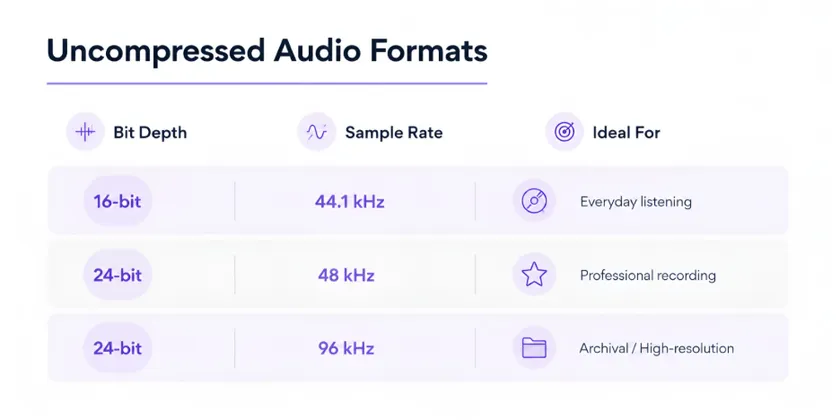
≫ Recording. WAV, at 24-bit depth and 44.1 or 48 kHz sample rate. Always uncompressed. Every layer of processing you do downstream benefits from starting with the cleanest possible source. For more on why sample rate and bit depth matter here, our guide on sample rate vs bit depth covers the full logic.
≫ Mixing and editing. Stay in WAV. Every bounce between mixing stages should stay uncompressed. If you convert to MP3 mid-workflow to save space, you are throwing away audio detail that every subsequent stage will miss.
≫ Mastering. WAV. Every professional mastering service, including AI mastering tools, expects a WAV file at 24-bit and 44.1 or 48 kHz. Uploading an MP3 to a mastering service means the algorithm is working with a lossy source. No mastering process can recover what has been discarded.
≫ Final delivery to streaming platforms. WAV or FLAC. Both are lossless. FLAC is smaller for the same quality, which is why some producers prefer it. Either works.
≫ Sharing rough versions with collaborators or clients. MP3 at 320 kbps. Small file size, universal playback, and quality that is more than adequate for making creative decisions. Anything you plan to actually work on further should stay in WAV.
The pattern is straightforward. Lossless for everything critical. Lossy only for casual sharing.
What About AAC, AIFF, and Others?
The three formats above cover most of what a producer needs. A few others exist and matter in specific contexts.
- AAC is a lossy format designed as an improvement over MP3. It sounds better than MP3 at the same bitrate. AAC is the default format inside the Apple ecosystem, and Apple Music uses it for streaming playback.
- AIFF is Apple’s uncompressed audio format. It is functionally identical to WAV in every way that matters. You can treat them as interchangeable.
- ALAC is Apple’s lossless compressed format. It is Apple’s equivalent to FLAC. It compresses lossless audio and integrates cleanly with Apple’s ecosystem.
- Ogg Vorbis is an open-source lossy format. Spotify uses it internally for streaming playback. You will rarely need to work with it directly.
For a comprehensive breakdown of every audio format, LANDR’s guide to audio file formats covers the full landscape. For an indie producer’s day-to-day work, MP3, WAV, and FLAC are enough.
What Streaming Platforms Actually Want
Delivery requirements vary slightly by platform. Here is what each of the major streaming services accepts as of 2026.
- Spotify accepts WAV or FLAC files, at 16-bit or 24-bit depth and 44.1 kHz minimum. Their internal streaming uses Ogg Vorbis, but you should not deliver in Ogg.
- Apple Music accepts WAV, FLAC, or AIFF at 24-bit and 44.1 kHz or higher. Their spec is stricter than Spotify’s.
- Amazon Music accepts WAV, FLAC, or AIFF for HD and Ultra HD tiers.
- Tidal accepts WAV or FLAC, up to 24-bit and 192 kHz for their HiFi Plus tier.
- YouTube Music accepts WAV or FLAC and converts to AAC for playback.
The pattern across every major platform is identical. Deliver in WAV or FLAC. Never deliver in MP3.
For a full walkthrough of preparing your master for streaming, our guide on how to master your track in 5 steps covers the delivery stage in detail.
The One Rule to Remember
Master and deliver in lossless. Share in lossy.
Every format decision you make comes back to this rule. WAV or FLAC for anything critical. MP3 only when you need a small file for casual listening.
Everything else is context.
Choose the right format
The right file format at the right stage keeps quality intact from recording to release. Get any stage wrong and the damage compounds down the chain, no matter how carefully you work later.
Record in WAV. Mix in WAV. Master from WAV. Deliver in WAV or FLAC. Share rough versions in MP3. That is the workflow that keeps every ounce of quality you captured all the way to the listener’s speakers.
Remasterify accepts WAV, MP3, MP4, and FLAC inputs and delivers a release-ready master in HD WAV and optimized MP3 formats. Upload your finished mix, hear it mastered in a few minutes, and download the exact format your streaming platform expects.