
There’s a specific kind of frustration that hits when a mix isn’t working. You know the one.
You’ve listened to the track fifty times. Something feels off, but you can’t pinpoint what. Maybe the vocal is buried. Maybe the low end is fighting itself. You’ve already bounced the mix, sent it to a friend, and you don’t want to reopen the whole session.
So, you drag it into an AI stem splitter. Vocals, drums, bass, everything else. Now you can fix the one thing that’s bothering you and remix it back together. In and out in ten minutes.
Except mastering doesn’t quite work that way.
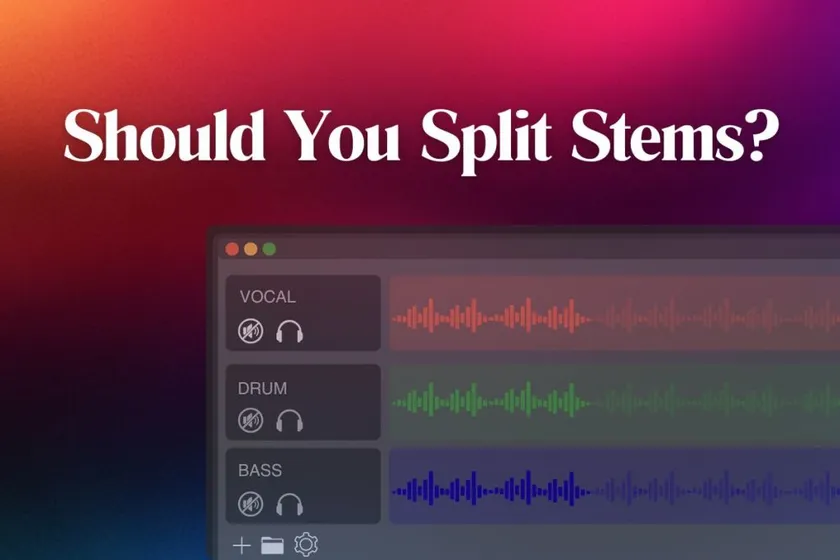
There’s a real distinction here that most people miss, and it changes everything.
AI stem separation (splitting a bounced mix back apart) is not the same thing as legitimate stem mastering (working from clean DAW-exported stems). One is a workaround that quietly damages your audio. The other is a professional service Abbey Road actually offers.
This post walks through the difference, when each approach makes sense, and what actually gives you the best final master.
TL;DR
- AI stem separation and legitimate stem mastering are not the same thing. Getting the two confused causes bad workflow decisions.
- AI splitters like Spleeter reconstruct audio from a bounced mix. The output has artifacts that mastering can’t fully fix.
- Real stem mastering uses clean stems bounced directly from your DAW. Abbey Road offers it as a professional service.
- Fix mix problems in the DAW, not with an AI splitter after the fact. The source you feed mastering matters more than the tool.
- For most tracks, a full stereo bounce is what mastering wants. Not stems. Not reconstructions.
The Two Practices That Both Get Called “Stem Mastering”
Before anything else, get this distinction clear.
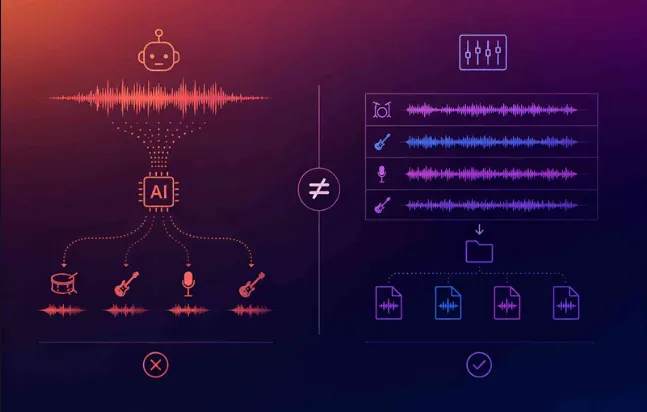
- AI stem separation is when you take a finished stereo mix (already bounced from the DAW) and use an AI tool to reverse-engineer it back into individual tracks.
Tools like Spleeter, LALAL.AI, and Moises analyze frequency content and spatial cues to approximate the original vocals, drums, bass, and other elements. The output is a best-guess reconstruction, not a clean isolation.
- Legitimate stem mastering is when the mix engineer bounces stems directly from the DAW (drums, bass, vocals, and other groups as separate stereo files) and sends those clean stems to the mastering engineer. This is an established professional practice. Abbey Road Studios offers stem mastering as a service, and so do many top mastering engineers.
The names are similar. The workflows are completely different.
One starts from clean source audio. The other starts from a reconstruction.
Almost every complaint about “stems before mastering” is really a complaint about the first practice, not the second.
How AI Stem Separation Actually Works
The technical reality of AI stem separation is worth understanding, because it explains why the output is different from real stems.
Modern AI separators use deep neural networks trained on massive datasets of paired mixes and isolated tracks.
Deezer’s Spleeter, released in 2019 and one of the most widely-used models, uses a U-Net convolutional neural network architecture to estimate soft masks for each source based on spectrogram analysis. Their published research paper in the Journal of Open Source Software documents the model in detail.
The important point: the AI is not extracting original tracks. It’s making an educated guess about which frequencies belong to which instruments based on patterns it learned during training.
When two instruments share frequency space, the model has to decide where each frequency goes.
When they share spatial position, the same problem repeats. The output usually sounds convincing at first listen, but on close inspection you’ll hear artifacts — slight metallic ringing, bleed between stems, phase inconsistencies, and softened transients.
These artifacts are inaudible in the full mix because everything is playing together. Once you isolate the stems, then remix them back together after processing, the artifacts become part of your final track. The reconstruction is never quite the same as the original bounce.
Why AI Stem Separation Before Mastering Usually Fails
Three real problems compound when you feed reconstructed stems into mastering.
- Phase alignment issues
Splitting a mix and then recombining introduces micro-delays and phase inconsistencies that were not present in the original stereo bounce. These small errors accumulate into audible smearing across the frequency spectrum.
- Loss of the mix’s dynamic relationships
A well-mixed track has compression, EQ, and reverb decisions that treat the whole song as one dynamic system. When you split the mix, you break these relationships. The mastering compressor no longer sees a cohesive whole. It sees isolated elements that were never meant to be processed apart.
- Compromised source for the mastering process
AI mastering platforms analyze the full frequency spectrum, transient behavior, and stereo image of a complete mix. Feeding them stem-reconstructed audio breaks that analysis. Any mastering process, human or AI, can only be as good as its input.
Our guide on why mixes sound muddy covers many of the underlying issues that make producers reach for stem splitters in the first place. Fixing the mix in the DAW almost always outperforms trying to reconstruct it after the fact.
When Stem Mastering Is Actually Legitimate
Not every use of stems is wrong. Real stem mastering, done with clean DAW-exported stems, has genuine professional applications.
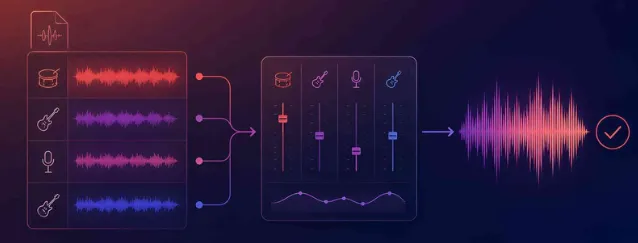
→ Some mixes benefit from surgical control at the mastering stage.
Sage Audio’s guide to preparing a mix for stem mastering explains that stem mastering gives the mastering engineer more flexibility than a stereo bounce alone. Independent adjustment of drums, bass, vocals, and other groups allows for corrections that would be impossible on a locked stereo file.
→ Some producers benefit from a second engineering opinion at the mastering stage.
If you’ve mixed the track yourself and want a mastering engineer to help refine the balance before finalizing loudness, stem mastering is a legitimate middle path between a full remix and traditional stereo mastering.
→ Complex arrangements sometimes need it.
Orchestral productions, layered electronic tracks, and dense rock mixes can benefit from stem-level processing that a single stereo file doesn’t allow.
The key detail: legitimate stem mastering starts with clean stems bounced from the original DAW project. Not stems reconstructed by AI from a bounced stereo file. The source matters.
The Right Workflow When Your Mix Has Problems
If you’re considering AI stem separation because something in your mix feels wrong, here’s what to do instead.
- Reopen the DAW and fix the mix at the source. This is almost always the right first move. It takes longer than running the bounce through an AI splitter, but the result is genuinely fixable for audio rather than a reconstruction.
- If the problem is a specific element (a vocal too quiet, a kick too weak), automate it in the mix, not the master. Volume automation on the offending element gives you clean control without introducing any artifacts.
- If the problem is tonal (harsh top-end, muddy low-mids), fix it with EQ on the appropriate bus or channel, not with stem separation. The Fletcher-Munson curve governs how these problems perceive at different volumes, and mix-stage EQ handles them cleanly.
- If you’ve genuinely lost the DAW session, consider legitimate stem mastering rather than AI separation. A professional mastering engineer working from a clean stereo bounce can accomplish more than an AI splitter can, and the result won’t have reconstruction artifacts.
In sum, fix problems at the source. Never fix what you could have fixed in production.
How AI Mastering Works Best
AI mastering platforms are built to analyze a full stereo mix as a unified system.
These platforms read the mix’s inter-track balance, its dynamic range, its tonal shape, and its stereo image, then apply processing that respects those relationships.
A stem-reconstructed mix breaks the original inter-track relationships. The AI mastering process starts from a compromised source, and the output can only be as good as the input.
Best practice is straightforward: upload the full stereo bounce of your final mix. Not stems. Not stem-reconstructed audio. The mix as it was intended to sound. Our complete guide on how to master your track in 5 steps covers the full workflow from mix bounce to release-ready master.
This is exactly where Remasterify is designed to work. Full stereo mix in, release-ready master out, no reconstruction required.
Pre-Mastering Checklist
Before uploading any track to a mastering service, check the following:
- Bounce a full stereo mix at 24-bit, 44.1 or 48 kHz WAV
- Leave 6 dB of headroom (peaks around -6 dBFS)
- No limiter on the master bus
- Check the mix in mono for phase issues
- Listen on multiple systems (headphones, monitors, phone speaker)
- Fix problems in the mix, not with AI stem tools
For a deeper walkthrough of headroom specifically, our guide on headroom in audio covers the full logic of why leaving space in your master matters.
What This Actually Comes Down To
Stem splitters are powerful tools for the right jobs. Creating instrumental versions of finished songs, learning how a mix was constructed, or fixing truly lost source material. They are not tools for finishing your own tracks.
The workflow that actually works is straightforward. Mix in your DAW, fix problems at the source, bounce a full stereo file, and hand that file to mastering.
Whether the mastering is done by a human engineer, an AI platform, or a combination of both, the process works best when the source is complete and unfragmented.
Remasterify is built exactly for your workflow
Upload your full stereo mix, hear it mastered in minutes, and download it ready for streaming platforms. No stems required, no reconstruction, no compromise.
FAQs
1. Should you split stems before mastering?
No, not with an AI stem splitter. AI tools like Spleeter and LALAL.AI reconstruct audio from a bounced stereo mix, and the reconstruction introduces phase issues, frequency bleed, and softened transients that mastering cannot fully fix. If you want stem-level control at the mastering stage, bounce clean stems directly from your DAW instead. That’s legitimate stem mastering and works properly.
2. What is the difference between AI stem separation and stem mastering?
AI stem separation uses machine learning to reverse-engineer a bounced stereo mix back into approximate individual tracks. Stem mastering is a professional service where the mix engineer bounces clean stems directly from the DAW and sends them to a mastering engineer. Both get called “stem mastering” casually, but only the second one produces genuinely clean source audio for the mastering process.
3. Is stem mastering better than stereo mastering?
It depends on the mix. Stereo mastering works when the mix is complete and well-balanced. Stem mastering gives the mastering engineer more surgical control over individual elements, which helps when a mix needs refinement at the mastering stage. Abbey Road Studios, Sage Audio, and many professional mastering engineers offer stem mastering as a legitimate service, especially for complex arrangements.
4. Can I fix a bad mix with an AI stem splitter?
No, not reliably. AI stem splitters introduce reconstruction artifacts that were not present in the original bounce, and remixing the split stems back together compounds those artifacts. The right approach is to reopen your DAW and fix mix problems at the source. Volume automation, EQ on the affected channel, or a full remix will produce better results than any AI stem-based workaround.
5. What format should I send for mastering: stems or a stereo mix?
Send a full stereo mix in most cases. Bounce a 24-bit WAV at 44.1 or 48 kHz with 6 dB of headroom and no limiter on the master bus. AI mastering platforms and most human mastering engineers are designed to work with a complete stereo bounce. If you specifically want stem mastering as a service, contact your mastering engineer first and bounce clean stems directly from your DAW.